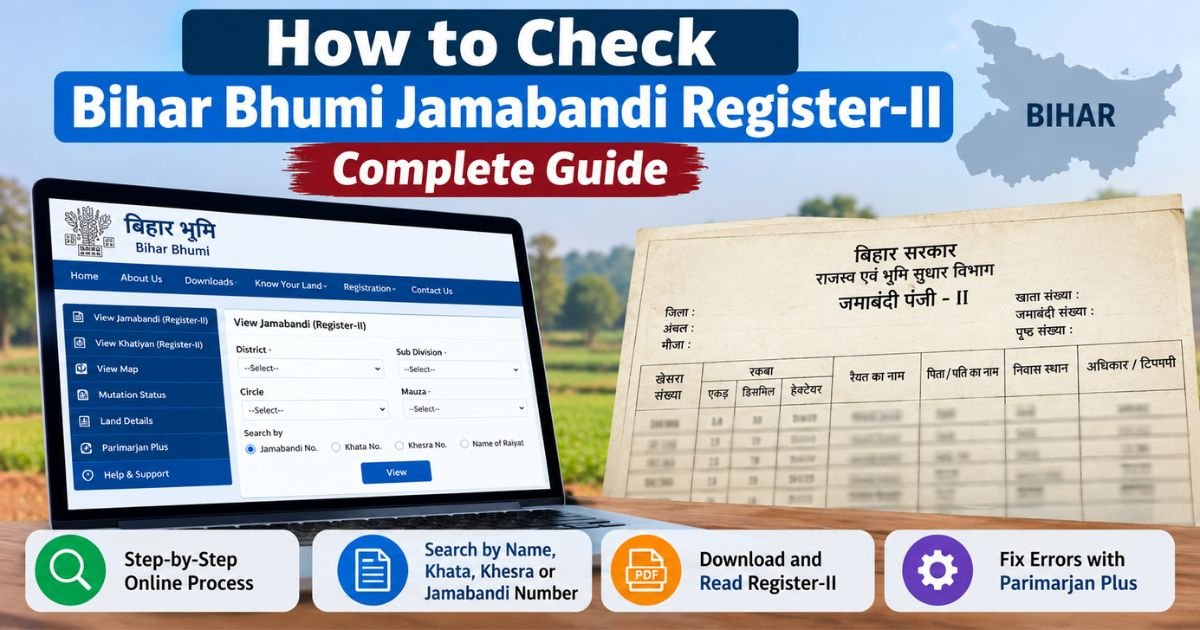
Bihar Bhumi Jamabandi Panji 2 is an online way to review land-revenue entries in Bihar. Checking a land record before a sale, inheritance claim, loan application, or family partition can prevent avoidable confusion. Bihar residents can use the state’s official land-record portal to view the Jamabandi Register-II, commonly called Panji 2. This guide explains how to search, read, save, and correct a record, while making clear when online information should be checked against original documents. A careful Bihar Bhumi Jamabandi Panji 2 (Register-II) check is a useful starting point.
Quick answer: Open the official Bihar Bhumi portal, choose “जमाबंदी पंजी देखें” (View Jamabandi Register), select the correct district, Anchal, Halka, and Mauza, then search using the information you have. The Bihar Bhumi Jamabandi Panji 2 (Register-II) result can help you review the recorded raiyat, land identifiers, area, rent details, and related entries. The exact fields shown may vary by record.
On This Page
- What Register-II means
- Official website
- Information to prepare
- Step-by-step online search
- Search without a Jamabandi number
- Meaning of key fields
- Correcting errors
- Why records may be missing
- Ownership and legal limitations
- Mobile tips
- Frequently asked questions
What Is Bihar Bhumi Jamabandi Panji 2 (Register-II)?
The Bihar Bhumi Jamabandi Panji 2 (Register-II) is a revenue record maintained for land-related administration in Bihar. It is commonly known as Panji 2 or Register-II. A Bihar Bhumi Jamabandi Panji 2 (Register-II) entry may show a recorded raiyat’s name, parent or guardian details, khata number, plot or khesra number, recorded area (rakba), boundaries (chauhaddi), land-revenue or lagan information, and mutation-related references.
People often use this record to review how a parcel is entered in the revenue system, check whether an online entry appears, or prepare for a follow-up with the revenue office. However, a revenue entry is not, by itself, a guarantee of clear legal title. For a purchase, inheritance dispute, mortgage, or court matter, compare the online entry with registered deeds, succession or partition documents, survey records, and relevant orders. Seek advice from a qualified local lawyer when ownership is disputed.
Official Website to Check Panji 2
Use the state’s official portal: biharbhumi.bihar.gov.in. Start any Bihar Bhumi Jamabandi Panji 2 (Register-II) lookup from this official source. The Register-II search form is also available through the government’s official Panji-II report page. Avoid look-alike websites that ask for unnecessary personal details or payment just to view basic record information. Portal layouts can change, so follow the current labels on the government site rather than relying only on screenshots from old articles.
The Bihar Bhumi Jamabandi Panji 2 (Register-II) service is intended for looking up revenue entries online. If a page is temporarily unavailable, try again later or use the official homepage to reopen the service. Do not share passwords, one-time codes, or sensitive identity details with unofficial agents.
Information to Keep Ready Before Searching
- District: the district where the land is located.
- Anchal: the relevant revenue circle or Anchal.
- Halka: the local revenue area, if requested by the form.
- Mauza: the correct village name; spelling and village selection matter.
- One search detail: raiyat name, khata number, plot/khesra number, Jamabandi number, computerized Jamabandi number, or current part and page details, depending on the available option.
- Stable internet access: a phone or computer browser is usually enough to open the public search page. These basics help you complete a Bihar Bhumi Jamabandi Panji 2 (Register-II) search without unnecessary retries.
You do not need to know every number in advance. If the Bihar Bhumi Jamabandi Panji 2 (Register-II) search does not return a result, verify the village and try another identifier that appears on an old receipt or document.
How to Check Bihar Bhumi Jamabandi Panji 2 (Register-II) Online
Step 1: Open the official portal
Type the official Bihar Bhumi address into your browser or use the direct government Register-II report link above. Confirm that the address belongs to the Bihar government domain before entering search details. On the homepage, find the option labelled “जमाबंदी पंजी देखें” or its current equivalent.
Step 2: Choose the location details
Select the district, Anchal, Halka, and Mauza as requested by the page. Depending on the current interface, you may need to click “Proceed” before the next fields become available. Select the village where the parcel is actually recorded, not simply the village where a family currently lives. This is especially important when checking Bihar Bhumi Jamabandi Panji 2 (Register-II) entries for nearby villages with similar names. Nearby villages can have similar names.
Step 3: Select the best search method
The official form provides several ways to search. Choose one field at a time and enter the value carefully. Options may include raiyat name, plot number, khata number, Jamabandi number, computerized Jamabandi number, current part and page, or viewing the village’s Register-II entries by name. Availability may depend on the page and record type.
Step 4: Complete the displayed verification
If the form shows a security calculation or verification field, enter the answer exactly as requested. Continue the Bihar Bhumi Jamabandi Panji 2 (Register-II) lookup using the selected location and search value, then select “Search.” If the page displays no results, check for typing errors, alternate spellings, misplaced digits, and the selected Mauza before assuming the record is missing.
Step 5: Open the matching entry
Review the results list before opening a record. Compare the raiyat name, khata, plot number, village, and other visible identifiers with your papers. Select the “देखें” or view control for the entry that best matches. Do not assume that a similar name alone identifies the correct land parcel when checking Bihar Bhumi Jamabandi Panji 2 (Register-II) results.
Step 6: Read and save the record
Read all available fields, including the land area, boundaries, revenue details, and any mutation reference. If the page offers a print control, use it. You may also be able to choose your browser’s Print option and select “Save as PDF.” This creates a convenient copy of what is displayed; it does not necessarily make the file a digitally signed or certified extract. If an office, bank, court, or transaction requires a certified document, confirm the required format with that institution or the relevant department.
How to Search Without a Jamabandi Number
Many families have an old lagan receipt, a deed, or a handwritten note but do not know the current Jamabandi number. In that situation, the Bihar Bhumi Jamabandi Panji 2 (Register-II) page may still be searchable using another field.
- Search by raiyat name: enter the name as it may appear in the revenue record. Try spelling variants if the first search fails, and verify other land identifiers before choosing a result.
- Search by khata number: use the number from a relevant land paper. A khata may relate to more than one plot, so check the plot details too. This cross-check is important when using Bihar Bhumi Jamabandi Panji 2 (Register-II) information for family records.
- Search by plot or khesra number: enter the plot identifier and confirm the village and area shown in the result.
- Search by computerized number: use this option only if you have the computerized Jamabandi number shown on a record or receipt.
- Search by part and page: use current part and page details when they are available from a prior register copy.
- View the village list: where the portal offers a complete Register-II list for the Mauza, browse the list carefully. This can take longer in a large village.
When reviewing Bihar Bhumi Jamabandi Panji 2 (Register-II) results, match at least two or three independent details. Names can be shared by different people, and older documents may use alternate spellings or older administrative descriptions.
What Do the Main Register-II Fields Mean?
| Field | Plain-English meaning | What to check |
|---|---|---|
| Raiyat name | Name of the person recorded in the revenue entry | Compare spelling and parent/guardian details with supporting papers. |
| Khata number | Account or holding identifier used in the record | Do not confuse it with a deed number or a bank account. |
| Khesra / plot number | Identifier for a land parcel or plot | Compare with the deed, survey record, or map when reviewing Bihar Bhumi Jamabandi Panji 2 (Register-II) plot details. |
| Rakba | Recorded land area | Check the unit and compare with source documents; do not convert units by guesswork. |
| Chauhaddi | Recorded adjoining boundaries | Compare the four sides where available with the site and relevant papers before relying on Bihar Bhumi Jamabandi Panji 2 (Register-II) boundary details. |
| Lagan | Land revenue or rent-related entry | Check the amount, period, and receipt information shown. |
| Mutation reference | Reference to a mutation case or related update, where shown | Review the relevant case details separately if ownership or transfer is in question. |
Older records may contain handwritten entries, abbreviations, legacy units, or scripts that are difficult to read. For historical Bihar documents written in Kaithi, see our Kaithi script guide and Kaithi document translation guide. For older Urdu revenue documents, see the site’s Urdu land records guide. These guides can help with reading, but uncertain entries should be checked against the original record and an appropriate expert.
How to Correct an Error in Jamabandi
If a name, parent’s name, address, khata, khesra, area, boundary, or lagan entry appears incorrect, do not edit or rely on a self-made copy. The state provides the official Parimarjan Plus portal for applications involving correction of digitized Jamabandi entries and digitization of certain records that are not available online.
Choose the right application type
Parimarjan Plus distinguishes between correction in older digitized Jamabandi entries, correction in entries created after online mutation, and digitization of a Jamabandi that was left out of online records. The appropriate path depends on the nature of the error and how the entry was created. Check the current Bihar Bhumi Jamabandi Panji 2 (Register-II) details before choosing a correction route. Follow the portal’s current application labels and user manual; do not assume that every type of correction uses the same form.
Prepare supporting evidence
Before starting, collect the relevant papers for your specific case. Depending on the requested correction, these may include an old Jamabandi or lagan receipt, registered deed, mutation order, survey or khatiyan record, inheritance or partition papers, identity details, or other documents requested by the portal. This is a practical preparation list, not a guarantee that every item is required. Follow the official checklist for the selected application type.
Submit and track the application
Use the official Parimarjan Plus page to sign in or register as directed, choose the correct service, enter the details, upload the requested evidence, and review the application before final submission. Keep the acknowledgement or application number. You can return to the portal’s application-tracking facility to check status or respond to a deficiency notice. A submission does not mean the correction has already been approved; the competent revenue authority must examine it through the prescribed process. Recheck the Bihar Bhumi Jamabandi Panji 2 (Register-II) entry after the department records its decision.
If the issue involves the wrong Mauza or a complex record mismatch, the official FAQ notes that some cases may require an offline application to the Circle Officer or a separate prescribed process. Read the current official instructions for your specific issue. The Bihar Bhumi Jamabandi Panji 2 (Register-II) entry should be treated as corrected only after the department’s process is completed and the updated record is visible or otherwise confirmed.
Why a Record May Not Appear Online
- Wrong location selected: verify district, Anchal, Halka, and Mauza.
- Spelling differs: try a reasonable name variant and compare other identifiers.
- Old record was not digitized: check the official Parimarjan Plus option for digitization of a missing Jamabandi.
- Mutation is pending or recently processed: check the official mutation status service and allow for the record to be updated through the prescribed process.
- Record appears under another village: do not assume that the entry is correct. Follow official guidance for a Mauza-mapping error.
- Portal or network issue: retry later and use the official homepage to reopen the service.
Do not pay an unofficial person who promises to make a record appear instantly. If a record is missing, preserve the evidence you already have and use the government’s stated process. This is safer than relying on an unverified Bihar Bhumi Jamabandi Panji 2 (Register-II) result from a third-party site.
Does Register-II Prove Ownership?
This is an important distinction. The Bihar Bhumi Jamabandi Panji 2 (Register-II) can show the revenue entry recorded for a holding, but it should not be treated as the only document needed to establish clear title. Revenue records, registration documents, survey records, inheritance documents, possession, court orders, and the history of transfers may all be relevant, depending on the circumstances.
Before buying land, verify the registered deed and transfer chain, check for disputes or encumbrances where applicable, compare the physical parcel with the records and map, and confirm the status of mutation. If an entry conflicts with a deed or another family member’s claim, get professional legal guidance rather than assuming the online record settles the dispute. Treat Bihar Bhumi Jamabandi Panji 2 (Register-II) as a revenue record to verify, not a substitute for legal review.
Mobile Tips for Bihar Land Records
You can generally open the government portal in a mobile browser. Use landscape mode if a wide table is hard to read, zoom in to compare figures, and avoid taking a screenshot as your only saved copy if the page offers a print option. Save a PDF with a clear filename and date so you can distinguish it from an older copy. Keep personal copies secure, especially when sharing documents with brokers or people you do not know. Store any Bihar Bhumi Jamabandi Panji 2 (Register-II) PDF with the date you accessed it.
For Bihar Bhumi Jamabandi Panji 2 (Register-II) searches on a phone, use a stable connection and enter numbers slowly. If the dropdowns do not load, refresh the official page or try a desktop browser. Never assume a third-party app is official just because its name includes “Bihar Bhumi.” Check the state portal for the current list of services.
Frequently Asked Questions
Is there an official fee to view Register-II online?
The government’s public Register-II search page is provided for online viewing. Other services, certified copies, digitally signed records, or related applications may have different requirements. Check the current official portal and the institution requesting the document rather than relying on a third-party fee claim.
Can I check Panji 2 using only a name?
The portal offers a raiyat-name search, but names may repeat or be spelled differently. Confirm the result using the village, khata, plot number, area, or other available details.
Can I save the record as a PDF?
If the page has a print option, use it. Otherwise, your browser may offer “Print” and “Save as PDF.” A browser-saved PDF is not automatically a certified or digitally signed record. A downloaded Bihar Bhumi Jamabandi Panji 2 (Register-II) copy may need separate certification for official use.
What should I do if the recorded area is wrong?
Compare the entry with the supporting papers and check the current Parimarjan Plus guidance for the relevant correction type. Upload only the evidence requested by the official process and retain the acknowledgement number.
What if my old Jamabandi is not online?
Check the official Parimarjan Plus portal for the option covering digitization of a Jamabandi not available online. The department may require supporting evidence and will review the application before any entry is added.
Does mutation automatically settle every ownership dispute?
No. Mutation is a revenue-record process. It does not, by itself, resolve every dispute about title, inheritance, boundaries, or the validity of a deed. Seek legal advice if the underlying rights are contested.
Conclusion
The official Bihar Bhumi portal gives residents a practical way to view their land’s Register-II entry without beginning at a revenue office. Select the right location, search with a reliable identifier, and compare the result with your own papers before using it for a transaction or dispute. A careful Bihar Bhumi Jamabandi Panji 2 (Register-II) review can help identify discrepancies early. If a record is missing or incorrect, follow the current official Parimarjan Plus process and retain the application reference.
Use the Bihar Bhumi Jamabandi Panji 2 (Register-II) service as one part of careful land-record verification—not as a substitute for checking the original documents or obtaining legal advice when needed. For historical records, the site’s guides to Mauza, Khata, Khesra, and Thana numbers may also help you understand the identifiers written on older papers.